Level 1 - Enterprise-level architecture
This section builds on the Level 0 - Enterprise and Strategic Context to describe enterprise-wide and cross-domain data and data platform architecture concepts.
Why It Matters
Section titled “Why It Matters”Establishing a clear enterprise-wide, cross-domain design (the “town plan” for data) ensures that platform architecture, capabilities and investments are purposefully coordinated across the organisation.
This reduces duplication and enables shared infrastructure, and is needed to build a scalable, interoperable and sustainable data platform aligned with the organisation’s long-term vision.
Table of Contents
Section titled “Table of Contents”- Key concepts
- Reference topologies
- Hybrid federated mesh topology
- Enterprise Data Platform Reference Architecture
- Enterprise (Logical) Data Warehouse Reference Architecture
- Enterprise Information and Data Architecture
- Enterprise Metadata Architecture
- Enterprise Security
- Enterprise Data Governance
- Enterprise Billing
Key concepts
Section titled “Key concepts”The following key concepts are used throughout this knowledgebase.
Domain-Centric Design
Section titled “Domain-Centric Design”Using domains as logical governance boundaries helps ensure data ownership and accountability. This approach aligns with the data mesh principle of decentralizing data management and providing domain teams with autonomy.
Our use of this term is based on Domain-Driven Design and Data Mesh principles. See Domain driven design
Illustative example domains for a Healthcare organisation

Domain
Section titled “Domain”Domains relate to functional and organisational boundaries, and represent closely related areas of responsibility and focus.
- Each domain encapsulates functional responsibilities, services, processes, information, expertise, costing and governance.
- Domains serve their own objectives while also offering products and services of value to other domains and the broader enterprise.
- Domain can exist at different levels of granularity and their boundaries may not be obvious. They are not necessarily a reflection of the organisational chart.
Subdomain
Section titled “Subdomain”A subdomain is a lower-level domain within a parent domain that groups data and capability related to a specific business or function area.
Example of authoring domains using Intuitas’ Domain builder tool

Screenshot from an earlier product version; to be re-captured.
Data Mesh
Section titled “Data Mesh”A data mesh is a decentralised approach to data management that shifts ownership and accountability to domain teams, who treat their data as a product. Each domain is responsible for creating, maintaining, and sharing high-quality, discoverable, and interoperable data products with other domains.
The data mesh approach emphasizes domain autonomy, self-serve infrastructure, interoperability, and federated governance. It is not a one-size-fits-all model; its suitability depends on an organisation’s context, culture and capabilities, and its adoption will vary in maturity and success across organisations.
Domain Topology
Section titled “Domain Topology”A Domain Topology is a representation of how domains are structured, positioned in the enterprise, and how they interact with each other. See Data Mesh: Topologies and domain granularity
Data Fabric
Section titled “Data Fabric”A data fabric is a unified integration and governance layer across many sources. While some interpretations consider a data fabric to be a single consolidated store, this blueprint treats it as a governed network of sources of truth with consistent access, metadata and controls. It enables data sharing and collaboration across domains and supports data mesh principles.
Data Mesh vs Fabric
Section titled “Data Mesh vs Fabric”A data mesh and fabric are not mutually exclusive and can be complementary approaches, whereby a data mesh can be built on top of a data fabric.
Reference topologies
Section titled “Reference topologies”Organisations need to consider the current and target topology that best reflects their strategy, capabilities, structure and operating/service model.
The arrangement of domains:
- reflects its operating model
- defines expectations on how data+products are shared, built, managed and governed
- impacts accessibility, costs, support and overall experience.
Enterprise Domain Reference Topologies

Source: Data Mesh: Topologies and domain granularity, Strengholt P., 2022
Hybrid federated mesh topology
Section titled “Hybrid federated mesh topology”This blueprint depicts a Hybrid Federated Mesh Topology, which is one of several viable topologies. We use it as it is increasingly prevalent in larger, federated and more mature organisations, where distributed functional domains operate alongside a unified raw data engineering capability. While tailored for this topology, most of the guidance applies directly to organisations with a simpler or more centralised configuration. The topology-specific parts may be read as a target state and are not a prerequisite.
Key characteristics of this topology include:
Hybrid of Data Fabric and Data Mesh:
- Combines centralised governance with domain-specific autonomy.
- Offers a unified platform for data integration, alongside domain-driven flexibility.
Fabric-Like Features:
- Scalable, unified platform: Connects diverse data sources across the organisation.
- Shared infrastructure and standards: Ensures consistency, interoperability, and trusted data.
- Simpler access: Simplifies workflows and reduces effort for data usage and insights delivery.
Mesh-Like Features:
- Domain-driven autonomy: Allows teams to create tailored solutions for their specific data and AI needs.
- Collaboration-focused: Teams act as both data producers and consumers, which supports reuse and efficiency.
- Federated governance: Ensures standards while allowing teams to manage their data locally.
Example of hybrid federated mesh topology:
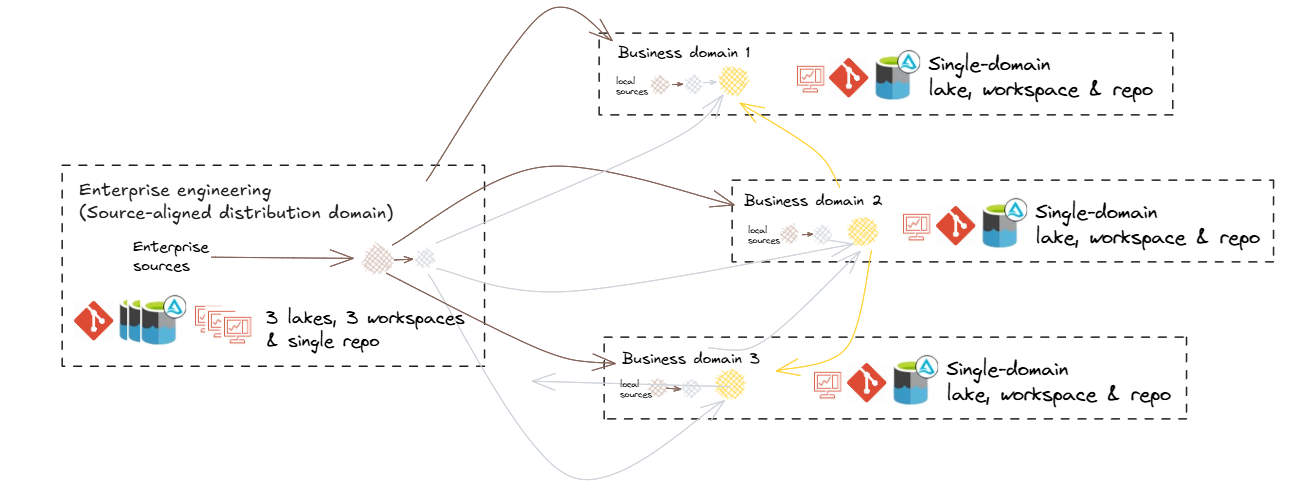
Hybrid federated mesh topology reflects a common scenario whereby centralisation occurs upstream for improved consolidation and standardisation around engineering, while federation occurs downstream for improved analytical flexibility and responsiveness.
Centralising engineering
Centralising engineering tasks related to source data processing allows specialised teams to efficiently manage data ingestion, quality checks, and initial transformations. This specialisation ensures consistency and reliability across the organisation.
Distributed Local engineering
Maintaining a local Raw (Bronze) zone for non-enterprise-distributed data enables domains to handle their specific raw data requirements, including use cases that are not yet enterprise-wide.
Cross-Domain Access
Allowing domains to access ‘gold’ data from other domains and, where appropriate, ‘silver’ or ‘bronze’, supports reuse, cross-domain analytics and collaboration, and hence data mesh interoperability.
Enterprise Data Platform Reference Architecture
Section titled “Enterprise Data Platform Reference Architecture”Describes the logical components (including infrastructure, applications and common services) that make up a default data and analytics solution, offered and supported by the enterprise. This artefact can then be used as the basis of developing domain-specific overlays.
Example Platform and Pipeline Reference Architecture
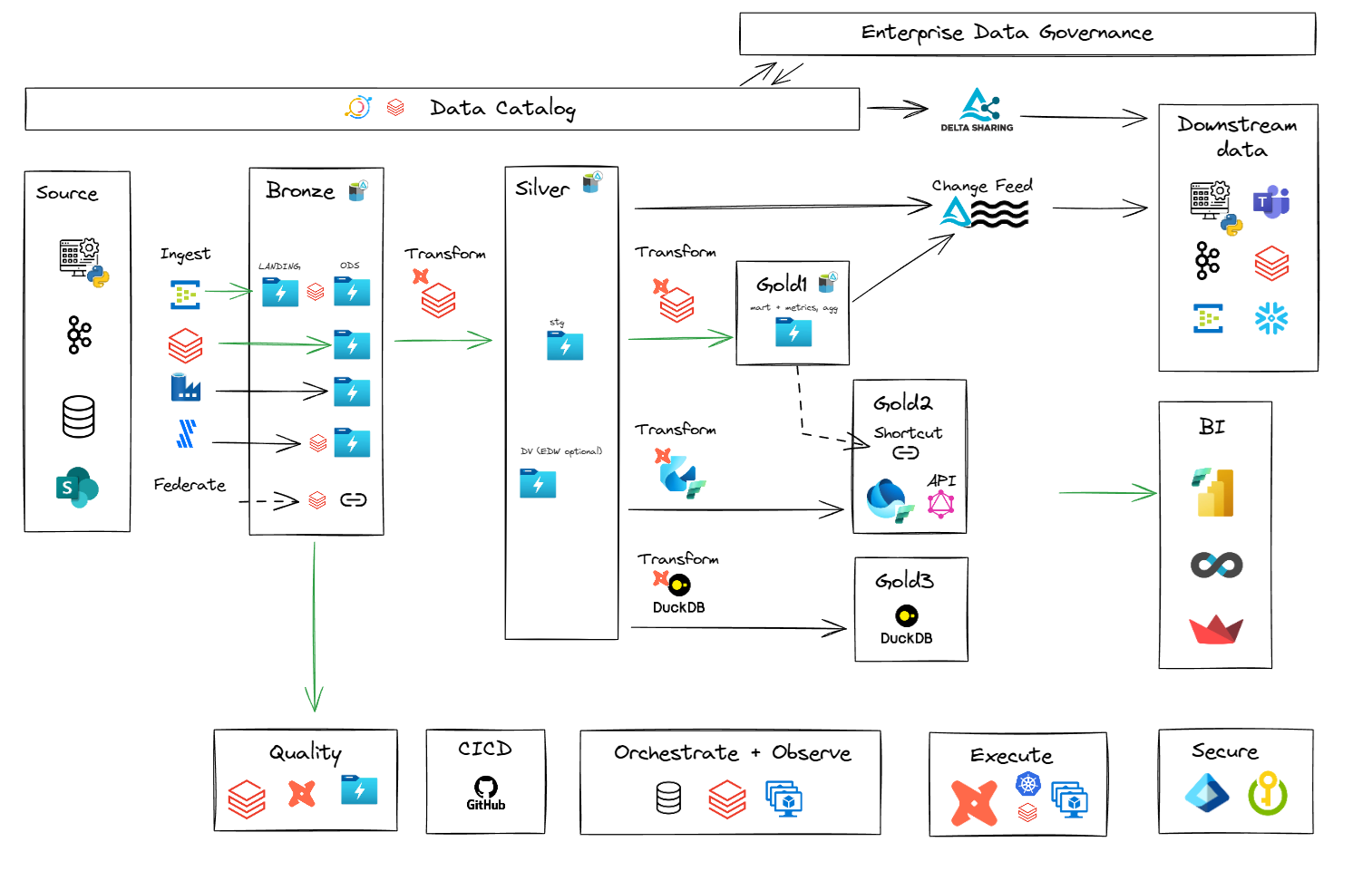
Note: Component-level choices within this reference architecture (ingestion, transformation, orchestration and serving) are detailed in Level 2 - Domain-level architecture. The default ingestion and orchestration components are the Lakeflow family: Lakeflow Connect, Lakeflow Declarative Pipelines (formerly Delta Live Tables) and Lakeflow Jobs (formerly Databricks Workflows). Azure Data Factory is repositioned as a hybrid-connectivity exception.
Enterprise (Logical) Data Warehouse Reference Architecture
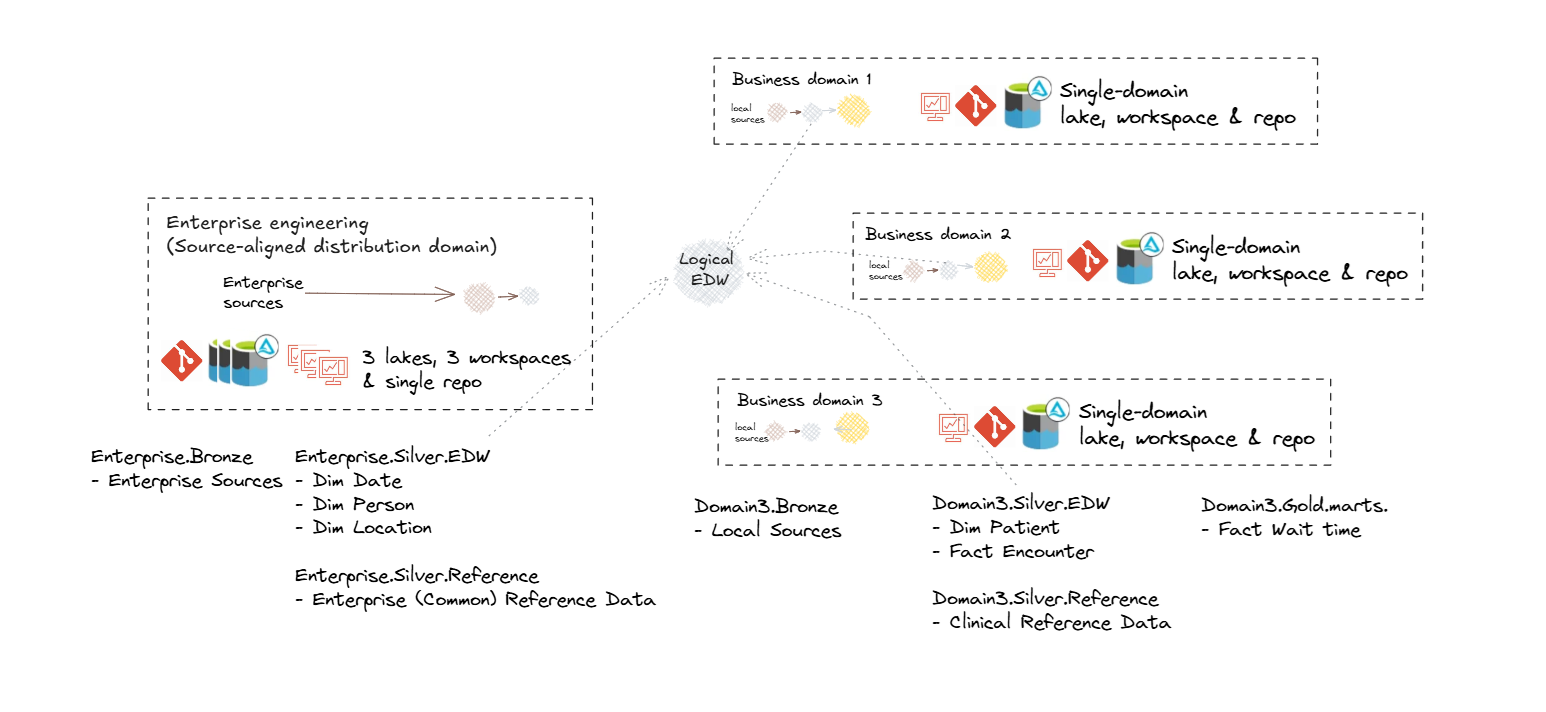
Section titled “Enterprise (Logical) Data Warehouse Reference Architecture”An enterprise logical data warehouse retains the core properties of a traditional data warehouse (integrated, consistent and analytics-ready data) while operating in a distributed, domain-oriented model.
Logical Data Warehouse topology is characterised by:
- Federated governance: shared policies and standards, but distributed custodianship, applied across the domain topology.
- Unified access: a common entry point for querying and consuming data regardless of its physical location
- Enterprise metadata: consistent definitions, lineage, and discovery across all domains via shared catalog.
This approach combines the scalability and agility of decentralised ownership with the trust and coherence of an enterprise-wide data platform.
Integrated entities and information marts
In this approach, enterprise consistency and requirement-specific delivery are provided by two zones:
- Integrated entities in the EDW (Silver) zone provide standardised, reusable business entities for enterprise-wide consistency. In a federated model, each entity is located in the domain that owns it.
- Information marts in the Infomart (Gold) zone deliver domain and business-requirement specific assets. Conformed dimensions are delivered here, as dimensional modelling is a consumption requirement. Each is built once by the domain that owns the entity, while other domains reference it.
Both are available for enterprise-aligned and domain-oriented reporting and analytics.
Diagram to be updated from 1.0.
Example logical data warehouse topology
Enterprise Information and Data Architecture
Section titled “Enterprise Information and Data Architecture”Solutions such as data warehouses and marts should reflect the business semantics relating to the scope of requirements, and will also need to consider:
- Existing enterprise information, conceptual and logical models
- Legacy warehouse models
- Domain information models and glossaries
- Domain business objects and process models
- Common entities and synonyms (which may form the basis of conformed dimensions)
- Data standards
Other secondary considerations:
- Source system data models
- Industry models
- Integration models
Enterprise Metadata Architecture
Section titled “Enterprise Metadata Architecture”Metadata is a general term for the types of data that support the description, governance and operational use of data and technology assets across multiple domains. It can be actively curated or generated as a byproduct of processes and systems.
Metadata Architecture Principles
Section titled “Metadata Architecture Principles”The following principles guide the design of a sustainable and effective metadata capability.
| Principle | Description |
|---|---|
| Accessible | Metadata must be easy to find, search, and use and maintain by business, technical and governance stakeholders. |
| Dynamic | Automate collection and updates to keep metadata fresh and reduce manual work. |
| Contextual | Connect the business, technical, governance and architecture perspectives. Provide the right metadata in the right place and format for the audience. |
| Integrated | Metadata exists across a set of tools to support diverse workflows. |
| Consistency | Use common standards, terms, and structures; Ensure all metadata is current and in-sync. |
| Secure | Protect metadata as it may contain sensitive details. |
| Accountability | Clearly define roles for ownership and stewardship. |
| Agnostic | Avoid vendor lock-in where possible. Keep metadata portable and open to ensure flexibility and interoperability. |
Semantic and Data lineage
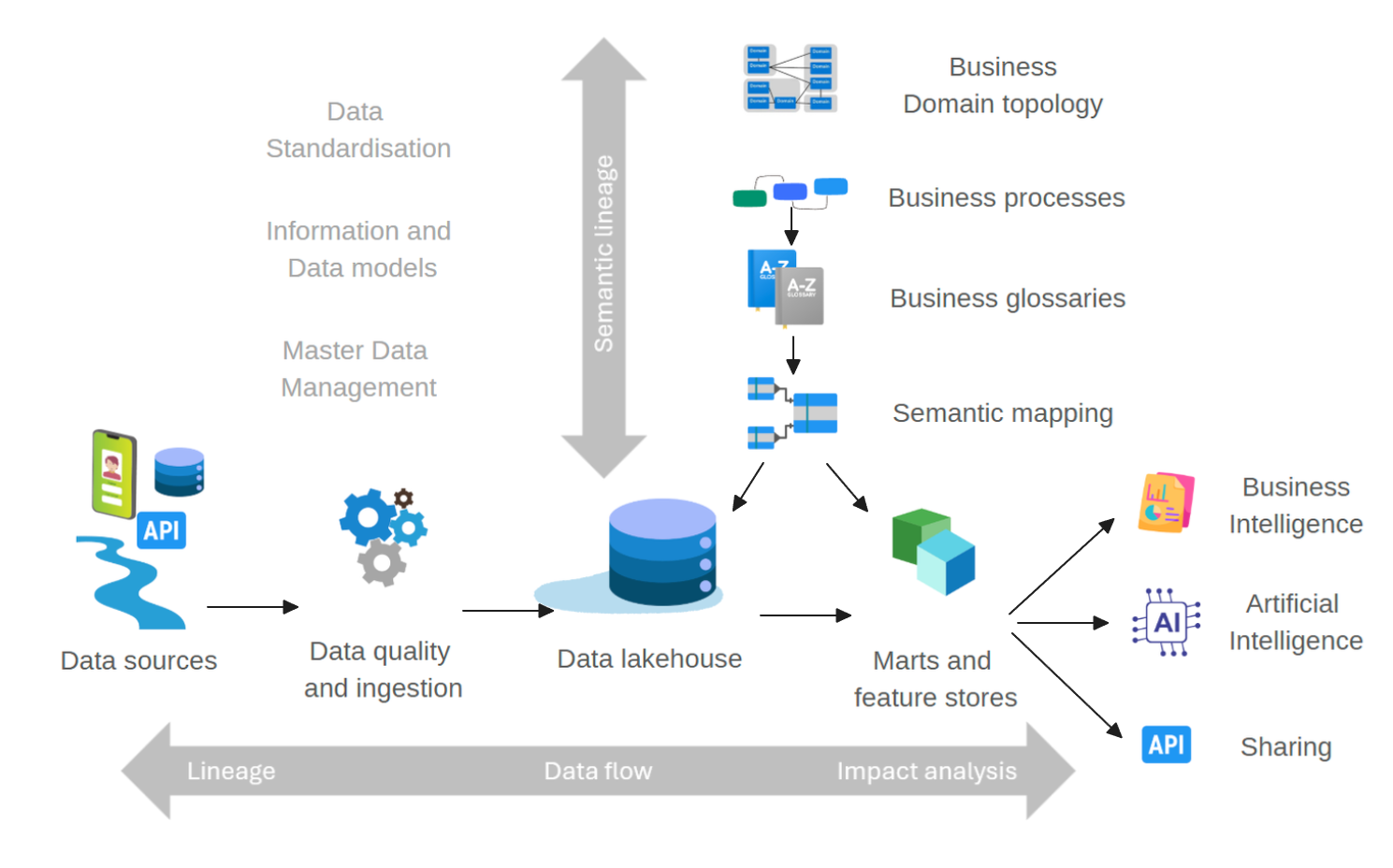
Section titled “Semantic and Data lineage”Semantic lineage and data lineage are core concepts in a data intelligence capability. They provide clarity, trust and traceability of data, from its business meaning to its technical origins and transformations:
-
Semantic Lineage maps business terms, definitions and relationships. It shows how concepts are represented and transformed across systems and domains.
-
Data Lineage tracks the technical flow of data from source to destination, including all transformations, to provide visibility, support data quality, and meet compliance and governance needs.
Together, they give a complete view of business and technical data flows, which supports governance and management of data assets. However, they are often difficult to align and keep in sync, hence a unified approach, as provided in the reference architecture, is required.
Data and Semantic Lineage
Metadata Objects and Elements
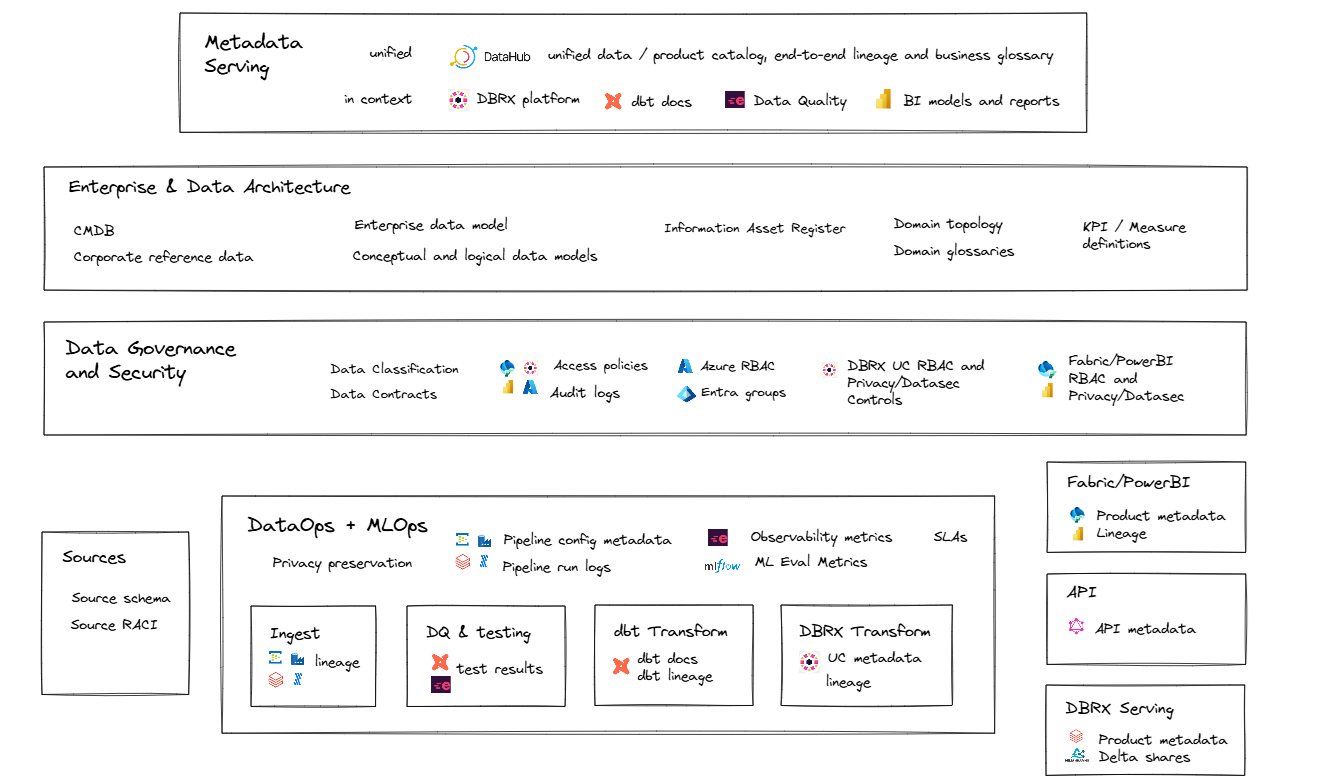
Section titled “Metadata Objects and Elements”Metadata exists in various types and formats, and for various purposes. Each supports:
- Data and Information Governance & Architecture, including semantic and data lineage, as well as privacy, access, and security - controls
- Data Engineering and Analytics Development
- Business Interpretation and Understanding, supporting the context and meaning of information and analytics
- Data Quality and Integrity
- Technical and Platform Administration
- Integration, Data Sharing, and Interoperability
The diagram below shows metadata objects and elements created and managed across various tools and contexts, each serving different purposes.
Metadata logical architecture
Metadata Consolidation and Synchronisation
Section titled “Metadata Consolidation and Synchronisation”Metadata consolidation and synchronisation are needed for a consistent, unified view of data assets that supports reliable lineage, governance and context across tools and platforms. This approach:
- Eliminates Silos: Aggregates metadata from diverse tools (e.g. dbt, Unity Catalog, PowerBI, MLflow) into a central catalogue such as DataHub or Microsoft Purview, so that all stakeholders access the same contextual information.
- Improves Trust and Traceability: Provides end-to-end lineage and visibility, whereby users can see where data comes from, how it is transformed, and how it is used across platforms.
- Enables Automation and Governance: Supports data quality, access control, and policy enforcement through unified metadata APIs and standardised governance models.
The diagram below illustrates metadata objects and elements that are created and managed across diverse tools and contexts, each with a distinct role.
Metadata flow
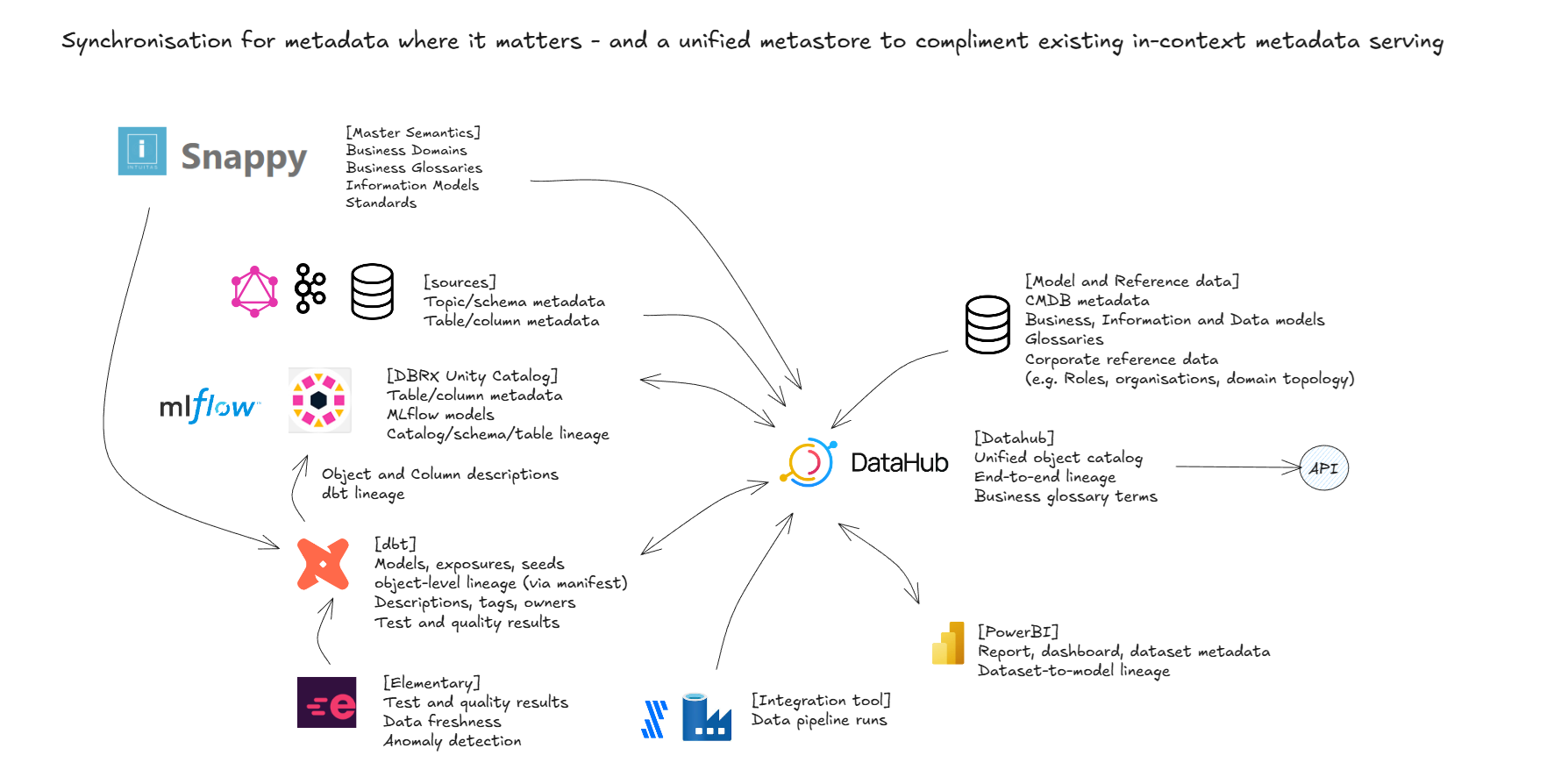
Diagram to be updated from 1.0.
Note: Unity Catalog metric views participate in this flow as governed, catalogued semantic objects. See Metric Views and Business Semantics.
Data Architecture and Governance Metadata
Section titled “Data Architecture and Governance Metadata”Metadata is essential for data governance as it provides context and information about data assets. The following metadata and tools are core to this capability.
Semantic modelling, mastering and lineage
Section titled “Semantic modelling, mastering and lineage”Snappy is a ‘business-first’ tool for authoring and mastering enterprise domains, models, standards and glossaries. It is the main source of semantic lineage under this blueprint, as it links the semantics used in practice, reference models and physical as-built metadata in Datahub.
Modelling Domains, Glossaries and Models in Intuitas’ snappy tool

Screenshot from an earlier product version; to be re-captured.
Unified metadata repository
Section titled “Unified metadata repository”A data governance tool is the consolidation layer that connects and integrates end-to-end data lineage, business domain models, and their associated glossaries and data assets. We use DataHub as the illustrative example throughout this blueprint. It is largely interchangeable with Microsoft Purview data governance (Data Map and Unified Catalog), which provides equivalent catalogue, glossary, lineage and governance domain capabilities. Wherever DataHub is named in this blueprint, Microsoft Purview may be read in its place. Atlan and Collibra provide similar functionality.
Two considerations increasingly affect this part of the architecture:
- Coexistence with Unity Catalog. The platform catalog natively masters a growing share of this metadata (lineage, governed tags, classification, AI-generated comments). Consider the system of record per metadata type: typically Unity Catalog for physical/as-built metadata and enforcement, and the governance tool for business context, cross-platform consolidation and stewardship workflow. One-way synchronisation is generally encouraged so that the same fact is not mastered twice.
- AI context layers. Semantic context for AI consumption, such as the ontology layers emerging over Databricks (Genie Ontology), is a fast-growing consumer of this metadata. Glossaries, models and lineage should be curated so they can supply these context layers as well as human discovery.
The diagram below shows how the governance tool (DataHub shown, largely interchangeable with Microsoft Purview data governance) consolidates lineage across platforms, domains and projects into one view of data flows and relationships.
Example: Datahub Lineage

Screenshot from an earlier product version; to be re-captured.
Example: Enterprise-wide summary of assets

Screenshot from an earlier product version; to be re-captured.
Example: Browse by business domain and filters

Screenshot from an earlier product version; to be re-captured.
Example: Metadata search by term

Screenshot from an earlier product version; to be re-captured.
Example: User-driven mapping of glossary terms to measures

Screenshot from an earlier product version; to be re-captured.
Example: User-driven tagging of PII

Screenshot from an earlier product version; to be re-captured.
Note: User-driven PII tagging, as illustrated above, remains valuable for curated business context. For enforcement at scale, it is superseded by Unity Catalog governed tags and agentic data classification. See ABAC, Governed Tags and Data Classification.
Analytics engineering metadata
Section titled “Analytics engineering metadata”- dbt Docs is the authoritative source for metadata related to SQL analytics engineering.
- It captures object, column, and lineage metadata, and provides a rich interface for discovery and documentation.
- dbt schema metadata is integrated with Databricks Unity Catalog.
- For more information, refer to standards and conventions.
Databricks Unity Catalog Metastore
Section titled “Databricks Unity Catalog Metastore”- Unity Catalog supports centralised governance of data and metadata across Databricks workspaces.
- Each region can have only one Unity Catalog metastore. This remains the position in current Unity Catalog best practices. Cross-region needs are met by Databricks-to-Databricks sharing.
- The metastore uses designated storage accounts to store metadata and related data.
- Unity catalog is able to
- store table, column and lineage metadata
- inherit schema metadata from dbt
- detect definitions using AI where they are missing
Example: Databricks AI-driven semantic detection

Screenshot from an earlier product version; to be re-captured.
Recommendations and Notes:
- Assign managed storage at the catalog level to enforce logical data isolation.
- Metastore-level and schema-level storage options also exist; current best practice gives preference to catalog-level storage as the primary unit of data isolation.
- Review catalog layout strategies to align with domain-oriented design.
- The metastore admin role is optional but, if used, should always be assigned to a group, not an individual.
- The enterprise’s domain topology directly influences the Unity Catalog design and layout.
ABAC, Governed Tags and Data Classification
Section titled “ABAC, Governed Tags and Data Classification”Attribute-based access control (ABAC), governed tags and data classification reached GA in May 2026 and together form the recommended scaling mechanism for row-level security, column masking and PII controls across the estate.
| Capability | What it provides | Status |
|---|---|---|
| ABAC policies | Row-filtering and column-masking policies attached at catalog, schema or table level, evaluated dynamically against tags rather than hand-written per table | GA (May 2026) |
| Governed tags | Account-level tag definitions with enforced allowed values and controlled assignment permissions | GA (May 2026) |
| Data classification | Agentic scanning that detects sensitive data (e.g. PII) and applies governed tags automatically | GA (May 2026) |
Relevance to the enterprise architecture:
-
Policy count scales with classifications, not tables. A single ABAC masking policy bound to a governed tag such as
piiprotects every current and future column with that tag. This replaces per-table masking functions and per-view logic as the default control at scale. GA limits allow approximately 10,000 policies per metastore. -
PII tagging is layered. Governed tags provide the controlled vocabulary, agentic classification proposes or applies the tags, and human stewards verify. The governance tool (DataHub, or Microsoft Purview data governance) consolidates the resulting metadata for discovery and governance reporting. Manual, user-driven tagging (illustrated in the DataHub examples above) remains a stewardship verification activity rather than the primary control.
-
Governed tags unify governance and cost metadata. The same enforced-vocabulary mechanism supports the tagging convention used for cost attribution. Tag keys follow the snake_case registry defined in standards and conventions.
-
Dynamic views retain a defined role. ABAC policies are not included in OpenSharing (formerly Delta Sharing) shares. Tables with row filters or column masks cannot be shared, and recipient-aware filtering on shares still requires dynamic views. See Level 2 - Sharing for the sharing-side guidance.
-
ABAC complements RBAC and does not replace it. Traditional privilege grants remain the foundation. Catalog-, schema- and object-level grants (to groups) still decide who can access an object. Traditional forms such as object- and column-level security via explicit grants and views remain valid where tag-driven policies do not fit. Known ABAC limitations also remain: policy count caps, tables with row filters or column masks cannot be shared, and cross-engine enforcement over the Iceberg REST Catalog is still in Beta.
Recommended layering: privilege grants (RBAC) come first and control access to the object. Governed tags + agentic classification are then used for discovery and labelling, ABAC policies for scalable in-platform row filtering and masking, and dynamic views for share-scoped filtering. Manual tagging remains a stewardship verification step and is not the primary control.
Table Formats and Interoperability
Section titled “Table Formats and Interoperability”Unity Catalog governs more than one table format, hence format strategy is an enterprise-level decision.
| Option | Use when | Status |
|---|---|---|
| Delta Lake (default) | The default format for all zones and layers in this blueprint; deepest platform integration (liquid clustering, predictive optimisation, change data feed) | GA |
| Managed Apache Iceberg tables | Cross-engine interoperability is a first-order requirement; full create/read/write in Unity Catalog with liquid clustering and predictive optimisation | GA |
| UniForm | Existing Delta tables need to be readable as Iceberg without migration | GA |
| Iceberg REST Catalog | External engines (including DuckDB, Trino, Snowflake and others) need governed read/write access to Unity Catalog tables via open APIs | GA |
| Lakehouse Federation: query federation | Query external systems in place (SQL Server, PostgreSQL, Snowflake, BigQuery, Oracle and others) via JDBC pushdown, before or instead of ingestion | GA |
| Lakehouse Federation: catalog federation | Mount external catalogs (Hive Metastore, AWS Glue, Snowflake Horizon) into Unity Catalog for unified governance over foreign Iceberg tables | GA-scope reads (May 2026) |
Recommendations:
- Delta remains the default under this blueprint. Consider adopting managed Iceberg per data product where a consuming engine requires it, and not as a blanket standard.
- The Iceberg REST Catalog gives external engines governed access to Unity Catalog tables, hence access decisions are governance decisions and do not depend on connectivity workarounds.
- Storage format is never encoded in object names. See standards and conventions.
- Cross-engine enforcement of ABAC policies over the Iceberg REST Catalog is in Beta (Preview) and should be re-verified before being relied upon.
Metric Views and Business Semantics
Section titled “Metric Views and Business Semantics”Unity Catalog metric views are GA and open-sourced. They are governed, catalogued definitions of measures and dimensions that are defined once and consumed consistently by AI/BI Dashboards, Genie, SQL clients and partner BI tools.
This capability fits into the semantic-lineage architecture described above, whereby each layer has a distinct, non-overlapping responsibility:
| Layer | Tool | Responsibility |
|---|---|---|
| Business semantics | Snappy | Masters domains, business models, standards and glossaries. This is the authoritative statement of what concepts mean |
| Transformation semantics | dbt | Records model, column, test and lineage metadata describing how data is derived |
| Runtime semantic layer | Unity Catalog metric views | Governs how measures and dimensions are calculated at query time, uniformly across consuming tools |
| Consolidation | DataHub (largely interchangeable with Microsoft Purview data governance) | Aggregates all of the above into a unified metadata repository for discovery, lineage and governance |
Recommendations:
- Define enterprise-critical measures as metric views in the mart schemas (naming:
mv_{subject}; see standards and conventions). Source them from EDW or infomart models so that dashboards, Genie and ad-hoc SQL use one governed calculation. - Link metric view measures back to Snappy glossary terms via the governance tool (DataHub, or Microsoft Purview data governance), which extends semantic lineage from business definition through transformation to the served metric.
- Deploy metric views through Declarative Automation Bundles (formerly Databricks Asset Bundles) alongside the jobs and pipelines that build their underlying models. See Level 2 - CICD.
Enterprise Security
Section titled “Enterprise Security”Recommended artefacts:
- Description of security policies and standards for both the organisation and industry
- Description of processes, tools, controls, protocols to adhere to during design, deployment and operation.
- Description of responsibilities and accountabilities.
- Risk and issues register
- Description of security management and monitoring tools incl. system audit logs
Security watch-list
Section titled “Security watch-list”Watch-list (not yet evaluated): Databricks announced Lakewatch, a lakehouse-native, agentic security analytics (SIEM) offering, in June 2026. It has been announced only, and as we have not evaluated it, it does not yet form part of this blueprint’s recommendations. Security teams operating on the platform should track its maturity as a candidate for security-log analytics over the same governed estate.
Enterprise Data Governance
Section titled “Enterprise Data Governance”Recommended artefacts:
- Description of governance frameworks, policies and standards including but not limited to:
- Custodianship, management/stewardship roles, RACI and mapping to permissions and metadata
- Privacy controls required, standards and services available
- Quality management expectations, standards and services available
- Audit requirements (e.g. data sharing, access)
- Description of governance bodies and decision rights
- Description of enterprise-level solutions and services for data governance
- References to Enterprise Metadata management
Note: ABAC policies and governed tags provide the platform-native enforcement layer for many privacy and access controls. Governance frameworks should reference the governed tag vocabulary as a controlled artefact.
Some organisations are bound to regulatory and policy requirements which mandate auditability.
Examples of auditable areas include:
- data sharing and access;
- platform access;
- change history to data.
Recommended artefacts:
- Description of mandatory audit requirements to inform enterprise-level and domain-level audit solutions.
Example questions and associated queries
Section titled “Example questions and associated queries”As an Enterprise Metastore Admin:
1. Where are there misconfigured catalogs / schemas / objects?2. Who is sharing what to who and is that permitted (as per access approvals?)3. Who is accessing data and are they permitted (as per access approvals?)The
system.access.auditsystem table remains the primary source for answering these questions, including OpenSharing (formerly Delta Sharing) share and access events.
Enterprise Billing
Section titled “Enterprise Billing”Large organisations typically need to track and allocate costs to organisational units, cost centres, projects, teams and individuals.
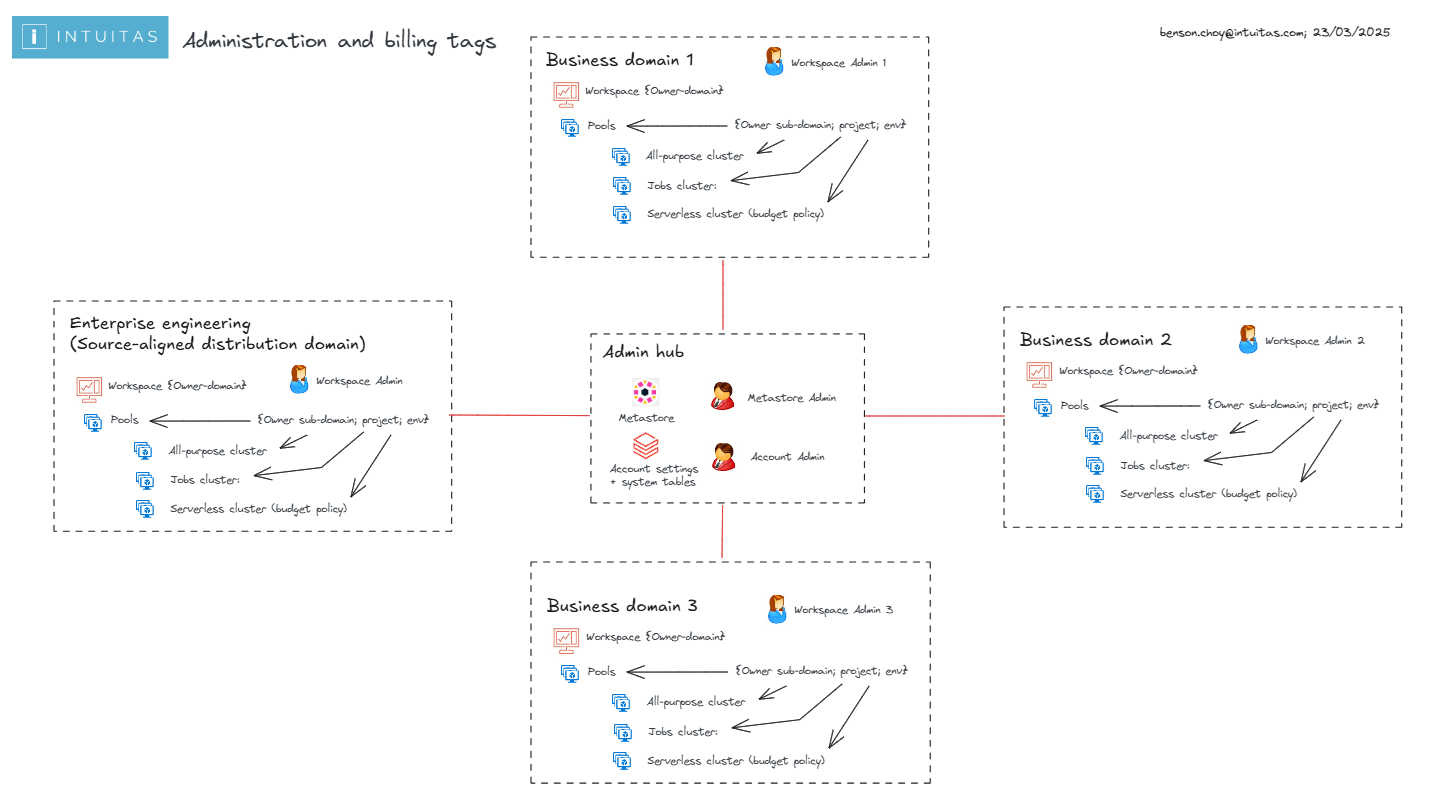
For this purpose, the Business Architecture of the organisation, domain topology, infrastructure topology (such as workspace delegations) and features of the chosen platform must align.
See:
Recommendations here align with the following Domain topology:
Administration and Billing Scopes
Two-track cost governance model
Section titled “Two-track cost governance model”The platform has shifted towards serverless compute (for jobs, notebooks, pipelines, SQL warehouses and apps), where cluster policies do not apply. Cost governance under this blueprint is hence a two-track model:
| Track | Compute | Tag enforcement mechanism | Status |
|---|---|---|---|
| 1 | Classic compute (all-purpose and job clusters) | Cluster policies with enforced tags | GA |
| 2 | Serverless (jobs, notebooks, pipelines, model serving, Lakebase, Databricks Apps) | Serverless usage policies (formerly serverless budget policies) | Public Preview (as at July 2026) |
Both tracks record their tags in system.billing.usage (serverless policy tags in custom_tags). Both are complemented by budgets, which provide account-level spend tracking with e-mail alerting, filterable by workspace and tags.
Known gaps to design around (Public Preview): serverless usage policies do not tag classic compute, and pipelines triggered by jobs do not inherit the job’s policy. Verify tag coverage via
system.billing.usagerather than assuming policy assignment equals attribution.
Databricks features for usage tracking
Section titled “Databricks features for usage tracking”Metadata and tags
Section titled “Metadata and tags”- In Databricks, metadata can be used to track activity:
- Workspace level
- Workpace owners identity
- Workspace tags
- Cluster level
- Authorised cluster users identities
- Cluster tags
- Serverless usage policies (formerly serverless budget policies; enforced tagging for serverless workloads; Public Preview)
- Job level
- Jobs and associated job metadata. Job-level attribution does not depend on job clusters. The
system.lakeflowjob tables (GA January 2026) join usage records to jobs, tasks and runs across classic and serverless compute.
- Jobs and associated job metadata. Job-level attribution does not depend on job clusters. The
- Query level
- Query comments (Query tagging is not yet a feature)
- Workspace level
- Tags from higher level resources propagate to lower level resources as per Databricks Usage Detail Tags.
Cluster policies
Section titled “Cluster policies”- Cluster policies can be used to enforce tagging at the cluster level (Track 1, classic compute).
- Cluster policies can be set in the UI or via Declarative Automation Bundles (formerly Databricks Asset Bundles) in resource yaml definitions.
Serverless usage policies and budgets
Section titled “Serverless usage policies and budgets”- Serverless usage policies (formerly serverless budget policies; Public Preview as at July 2026) attach cost-attribution tags to serverless usage by notebooks, jobs, pipelines, model-serving endpoints, Lakebase instances and Databricks Apps.
- Policy tags are recorded in
system.billing.usage.custom_tagsand propagate to Azure cost analysis, which makes the DBU-to-cloud-cost join easier. - Budgets provide account-level spend tracking and e-mail alerting, filterable by workspace and tags. Budgets are best treated as attribution and alerting, as hard spend caps remain an emerging capability and should not be assumed.
- Serverless-specific cost monitoring guidance: serverless billing system tables.
System tables
Section titled “System tables”- System tables provide granular visibility of all activity within Databricks.
- System tables only provide DBU based billing insights. Access to Azure Costs may require alternate reporting to be developed by the Azure administrator.
system.billing.list_pricesmonetises DBUs at list price only. Azure cost analysis remains the source of truth for total cost (serverless usage policy tags now propagate there, which makes the join easier). - By default, only Databricks Account administrators have access to system tables such as billing. This is a highly privileged role and is not fit for sharing broadly. Learn more
- Access delegation is grant-based: system tables are shared to workspaces via Unity Catalog, and account admins can
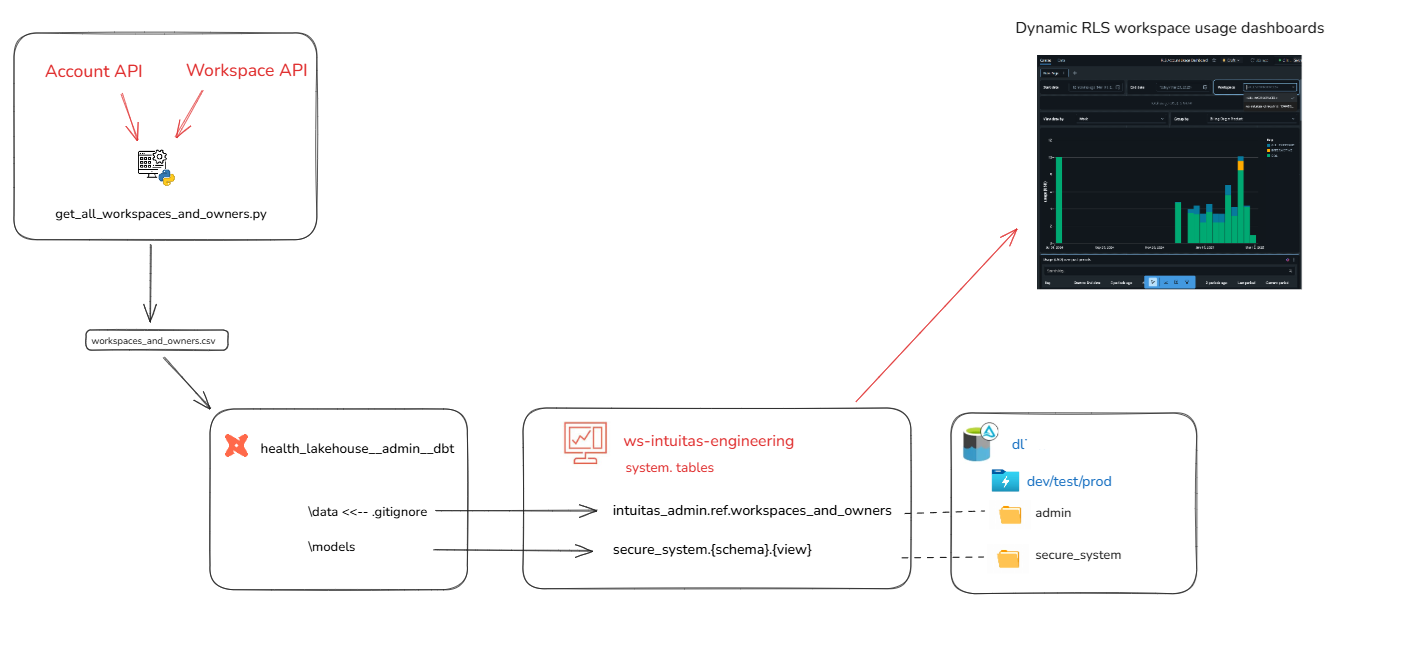
GRANT SELECTto any principal. For multi-tenant scoping, we recommend restricting workspace administrators to their domain / workspace via dynamic system catalog views with RLS applied based on workspace ID. (See Dynamic Billing Solution below. Available on request) - see repo Databricks System Tools - Schemas worth exposing (via the RLS-view pattern) per role include:
| System schema | Purpose | Notes |
|---|---|---|
system.billing | Usage and list prices; serverless policy tags in custom_tags | Core cost attribution |
system.lakeflow | jobs, job_tasks, job_run_timeline, job_task_run_timeline | GA January 2026. Provides job-level cost and run attribution without job clusters |
system.compute | Cluster and warehouse inventory and timelines | Capacity and right-sizing analysis |
system.access.audit | Audit events including sharing and access | See Audit |
system.query | Query history | Inefficient-query identification |
| Serverless billing views | Serverless cost monitoring | Complements usage policies |
Dynamic Billing Solution
Usage reports
Section titled “Usage reports”- Databricks supplies pre-built, importable cost-monitoring AI/BI dashboards. These are the recommended baseline, in preference to hand-building usage reporting. To use the imported dashboard, a user must have SELECT permissions on the
system.billing.usageandsystem.billing.list_pricestables. - Once workspace administrators have been delegated access to system tables, they can import a refactored version of the usage dashboard repointed to the RLS views, which preserves domain-scoped visibility. (See Dynamic Billing Solution above. Available on request)
Additional useful references:
- Top 10 Queries to use with System Tables
- Unlocking Cost Optimization Insights with Databricks System Tables
Domain and Workspace Administrator Role
Section titled “Domain and Workspace Administrator Role”- Workspaces are a container for clusters, and hence are suitable for representing a Domain scope.
- Domain administrators (i.e Workspace Admins) shall be delegated functionality necessary to monitor and manage costs withing their domain (Workspace):
- Ability to audit and shutdown workloads
- Ability to create serverless usage policies (Public Preview) and enforce them on serverless workloads
- Ability to create cluster tagging policies and enforce them on clusters
- Ability to delegate/assign appropriate clusters and associated policies to domain users
- Ability to call on Databricks Account Admin to establish and update budgets and budget alerts
Tagging convention
Section titled “Tagging convention”- All workloads (Lakeflow Jobs, serverless, shared compute) need to be attributable to at a minimum:
- Domain
- Environment: dev, test, pat, prod (see the canonical environment taxonomy in standards and conventions)
- In addition all workloads may need more granular tagging in line with cost-centre granularity hence may include one of more of the following depending on the organisation’s terminology:
- Sub-domain
- Team
- Business unit
- Cost centre
- Project
- In addition all scheduled Jobs would benefit from further job tags:
- Job name/id
Note: tag keys are snake_case and drawn from a shared registry spanning Unity Catalog governed tags, cluster policies, serverless usage policies, bundles and Azure resources. See standards and conventions. Defining the cost-attribution vocabulary as governed tags enforces allowed values account-wide.
Typical observability requirements by role
Section titled “Typical observability requirements by role”As an Enterprise Admin
1. What workloads are not being tagged/tracked?2. What is my organisation spending as a whole? - In databricks DBUs - Inclusive of cloud3. What are my subteams/Domains spending on within the workspaces I have delegated? - In databricks DBUs - Inclusive of cloud4. Where are we wasting money as an enterprise? - Reinventing the wheel - Over utilisationAs a Domain (workspace) Admin
1. What workloads are not being tagged/tracked?2. What is my domain spending as a whole? - In databricks DBUs - Inclusive of cloud3. What are my subteams spending on within the workspace I administer? - In databricks DBUs - Inclusive of cloud4. What are the most expensive activities? - By user - By job5. Where are we wasting money as an enterprise? - Reinventing the wheel - Over utilising - Redundant tasks - Inefficient queries